🎉 Up to 70% Off Selected ItemsShop Sale

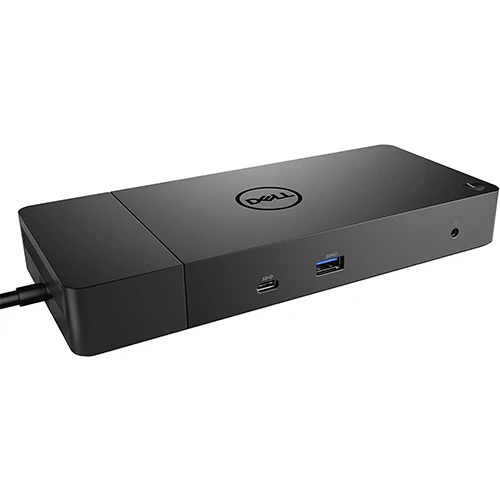
Dell WD19 Docking Station (210-ARIQ)
[shortdesc]
[properties] [/properties] [specifications]
- Docking Station, WD19, 180W, USB-C, HDMI, Dual Display Port, Black
| Technical Specifications | Dell WD19 Docking Station (210-ARIQ) |
| Product Type | Docking Station |
| Display Support with Dual USB-C input | (2) FHD @ 60 Hz (1) QHD @ 60 Hz (1) 4K @ 30 Hz |
| Max Resolution | 3840 x 2160 @ 30Hz |
| Video interfaces | (2) Full size DP1.4 (1) HDMI (1) MFDP USB-C |
| USB Ports | 3) USB-A 3.1 Gen 1 (2) USB-C 3.1 Gen 2 |
| Networking | Gigabit Ethernet |
| LED Indicators | Power Adapter LED Power Button LED RJ45 LEDs |
| Power | Power Adapter 180 Watt AC with up to 130 Watt power delivery Up to 90 Watts power delivery to non-Dell systems |
| Dimensions | 205mm x 90mm x 29mm 8.07in x 3.54in x 1.14in |
| Dock Weight (without power adapter) | 585g 1.29lbs |
| Operating Systems | Operating Systems Microsoft Windows 10 Ubuntu 18.04 Redhat Enterprise Linux |
| Systems Management | Wireless vPro supported by Notebook or Workstation |
| Docking Interface | USB-C |
| MAC Address | Pass Through MAC Address |
| Management Features | PXE Boot Wake-On-LAN MAC address pass-through Port Disablement Wake-On-Dock button Wake-On-Dock Dell Command Update (DCU) Error messages and dock event notifications |
Dell Docking Station WD19/WD19S links all your electronic devices to your laptop using a single USB Type-C (USB-C) cable. When you connect a supported laptop to the docking station, you can gain access to all your peripherals such as the mouse, keyboard, stereo speakers, external hard drive, and large-screen monitors without having to plug each device to the laptop.
Product Information
Product Information
Shipping & Returns
Shipping & Returns
Dell WD19 Docking Station (210-ARIQ)
Dell WD19 Docking Station (210-ARIQ)
[shortdesc]
[properties] [/properties] [specifications]
- Docking Station, WD19, 180W, USB-C, HDMI, Dual Display Port, Black
| Technical Specifications | Dell WD19 Docking Station (210-ARIQ) |
| Product Type | Docking Station |
| Display Support with Dual USB-C input | (2) FHD @ 60 Hz (1) QHD @ 60 Hz (1) 4K @ 30 Hz |
| Max Resolution | 3840 x 2160 @ 30Hz |
| Video interfaces | (2) Full size DP1.4 (1) HDMI (1) MFDP USB-C |
| USB Ports | 3) USB-A 3.1 Gen 1 (2) USB-C 3.1 Gen 2 |
| Networking | Gigabit Ethernet |
| LED Indicators | Power Adapter LED Power Button LED RJ45 LEDs |
| Power | Power Adapter 180 Watt AC with up to 130 Watt power delivery Up to 90 Watts power delivery to non-Dell systems |
| Dimensions | 205mm x 90mm x 29mm 8.07in x 3.54in x 1.14in |
| Dock Weight (without power adapter) | 585g 1.29lbs |
| Operating Systems | Operating Systems Microsoft Windows 10 Ubuntu 18.04 Redhat Enterprise Linux |
| Systems Management | Wireless vPro supported by Notebook or Workstation |
| Docking Interface | USB-C |
| MAC Address | Pass Through MAC Address |
| Management Features | PXE Boot Wake-On-LAN MAC address pass-through Port Disablement Wake-On-Dock button Wake-On-Dock Dell Command Update (DCU) Error messages and dock event notifications |
Dell Docking Station WD19/WD19S links all your electronic devices to your laptop using a single USB Type-C (USB-C) cable. When you connect a supported laptop to the docking station, you can gain access to all your peripherals such as the mouse, keyboard, stereo speakers, external hard drive, and large-screen monitors without having to plug each device to the laptop.
$66.15
Original: $189.00
-65%Dell WD19 Docking Station (210-ARIQ)—
$189.00
$66.15Product Information
Product Information
Shipping & Returns
Shipping & Returns
Description
[shortdesc]
[properties] [/properties] [specifications]
- Docking Station, WD19, 180W, USB-C, HDMI, Dual Display Port, Black
| Technical Specifications | Dell WD19 Docking Station (210-ARIQ) |
| Product Type | Docking Station |
| Display Support with Dual USB-C input | (2) FHD @ 60 Hz (1) QHD @ 60 Hz (1) 4K @ 30 Hz |
| Max Resolution | 3840 x 2160 @ 30Hz |
| Video interfaces | (2) Full size DP1.4 (1) HDMI (1) MFDP USB-C |
| USB Ports | 3) USB-A 3.1 Gen 1 (2) USB-C 3.1 Gen 2 |
| Networking | Gigabit Ethernet |
| LED Indicators | Power Adapter LED Power Button LED RJ45 LEDs |
| Power | Power Adapter 180 Watt AC with up to 130 Watt power delivery Up to 90 Watts power delivery to non-Dell systems |
| Dimensions | 205mm x 90mm x 29mm 8.07in x 3.54in x 1.14in |
| Dock Weight (without power adapter) | 585g 1.29lbs |
| Operating Systems | Operating Systems Microsoft Windows 10 Ubuntu 18.04 Redhat Enterprise Linux |
| Systems Management | Wireless vPro supported by Notebook or Workstation |
| Docking Interface | USB-C |
| MAC Address | Pass Through MAC Address |
| Management Features | PXE Boot Wake-On-LAN MAC address pass-through Port Disablement Wake-On-Dock button Wake-On-Dock Dell Command Update (DCU) Error messages and dock event notifications |
Dell Docking Station WD19/WD19S links all your electronic devices to your laptop using a single USB Type-C (USB-C) cable. When you connect a supported laptop to the docking station, you can gain access to all your peripherals such as the mouse, keyboard, stereo speakers, external hard drive, and large-screen monitors without having to plug each device to the laptop.